TASK 0002 has been released. The task time for the beginner class is from April 24 to May 7, and the intermediate class is from April 18 to April 25.
TASK 0002 content: https://github.com/baidu-ife/ife/tree/master/task/task0002
What I did: https://github.com/DIYgod/ife-work/tree/master/task0002
Online Demo: https://www.anotherhome.net/file/ife/task0002/task0002_1.html
This task took a total of 17 days (4.19-5.6)
Below are some records of my work on TASK 0002.
**1. JavaScript Performance Optimization ** (Refer to JavaScript Performance Optimization: Loading and Execution)
· Web developers are generally used to loading external link JavaScript in , and then using the tag to load external link CSS files or other page information. However, this common approach hides serious performance problems - the script will block the download of other resources on the page. Therefore, it is recommended to place all
· Since each <script> tag blocks page rendering when it is initially downloaded, reducing the number of <script> tags a page contains can help improve this situation.
· See the reference for other ways to reduce the impact of JavaScript on performance.
2. == and === (Reference The difference between the double equal sign ”==” and the triple equal sign ”===” in Javascript [The difference between three equal signs and two equal signs in JavaScript](http://www.cnblog s.com/litsword/archive/2010/07/22/1782933.html) [JavaScript Coding Specification](https://github.com/ecomfe/spec/blob/master/javascript-style -guide.md#%E5%BC%BA%E5%88%B6-%E5%9C%A8-equality-expression-%E4%B8%AD%E4%BD%BF%E7%94%A8%E7%B1%BB%E5%9E%8B%E4%B8%A5%E6%A0%BC% E7%9A%84-%E4%BB%85%E5%BD%93%E5%88%A4%E6%96%AD-null-%E6%88%96-undefined-%E6%97%B6%E5%85%81%E8%AE%B8%E4%BD%BF%E7%94%A8—null))
==: equal operation, but does not compare the types of values;
===: Complete equal operation, not only compares the value, but also compares the type of the value. It is true only if the two are consistent.
Baidu JavaScript coding specifications also stipulate that strict type === is mandatory in Equality Expression. <<<PROTECTED_BLOCK_5>> is allowed only when evaluating to null or undefined. Because using === can avoid implicit type conversion in the equal judgment.
3. Type detection (Reference [JavaScript Coding Specification](https://github.com/ecomfe/spec/blob/master/javascript-style-guide.md#%E5%BC%BA%E5%88%B6-%E5%9C%A8-equality-expression-%E4%B8%AD%E4%BD%BF%E7%94 %A8%E7%B1%BB%E5%9E%8B%E4%B8%A5%E6%A0%BC%E7%9A%84-%E4%BB%85%E5%BD%93%E5%88%A4%E6%9 6%AD-null-%E6%88%96-undefined-%E6%97%B6%E5%85%81%E8%AE%B8%E4%BD%BF%E7%94%A8—null) Javascript array type detection: Write a more powerful isArray function Javascript’s perfect solution to determine function type)
General simple approach: type detection is preferred using typeof. Object type detection uses instanceof. Detection of null or undefined uses == null
// string
typeof variable === 'string'

// number
typeof variable === 'number'

//boolean
typeof variable === 'boolean'

// Function
typeof variable === 'function'

// Object
typeof variable === 'object'

//RegExp
variable instanceof RegExp

// Array
variable instanceof Array

// null
variable === null

// null or undefined
variable == null

// undefined
typeof variable === 'undefined'
Determine the array type: get the string representation of the object, and then compare whether the string is ‘[object Array]’
function isArray(arr) {
    return Object.prototype.toString.call(arr) === '[object Array]';
}
9.20 update: The following also works
function isArray(arr) {
    return Array.isArray(arr);
}
Determine the function type: First ensure that the test object exists and serialize it into a string containing “function”. This is the basis of our detection (fn.constructor != String, fn.constructor != Array, and fn.constructor != RegExp). In addition, we need to ensure that the declared function is not a DOM node (fn.nodeName). Then, we can do the toString test. If we convert a function to a string, in a browser (fn+"") gives us the result like this “function name(){…}”. Now, determining whether it is a function is as simple as checking whether the string contains the word “function”. This works wonders, for any function in question, we get the results we need in all browsers. Compared with the traditional method, the running speed of this function is somewhat unsatisfactory. The author (John Resig) recommends that we use it conservatively.
function isFunction(fn) {
        return !!fn
        && !fn.nodeName
        && fn.constructor != String
        && fn.constructor != RegExp
        && fn.constructor != Array
        && /function/i.test(fn + '');
}
9.20 update: The above is too troublesome, you can judge it like Array
function isFunction(fn) {
    return Object.prototype.toString.call(fn) === '[object Function]';
}
Simple way to copy Array:
var a1 = [1, 2, 3]
var a2 = a1.slice(0);
4. Type conversion (Reference [JavaScript Coding Specification](https://github.com/ecomfe/spec/blob/master/javascript-style-guide.md#%E5%BC%BA%E5%88%B6-%E5%9C%A8-equality-expression-%E4%B8%AD%E4%BD%BF%E7%94 %A8%E7%B1%BB%E5%9E%8B%E4%B8%A5%E6%A0%BC%E7%9A%84-%E4%BB%85%E5%BD%93%E5%88%A4%E6%96 %AD-null-%E6%88%96-undefined-%E6%97%B6%E5%85%81%E8%AE%B8%E4%BD%BF%E7%94%A8—null))
number -> string:
num + '';
string -> number:
+str;

var width = '200px'; // When the end of the string to be converted contains non-digits and is expected to be ignored, use parseInt
parseInt(width, 10);
-> boolean:
var num = 3.14;
!!num;
Number removes decimal point:
var num = 3.14;
Math.ceil(num);
5. When traversing an ordered collection, cache length (Reference [JavaScript Coding Specification](https://github.com/ecomfe/spec/blob/master/javascript-style-guide.md#%E5%BC%BA%E5%88%B6-%E5%9C%A8-equality-expression-%E4%B8%AD%E4%BD%BF%E7%94 %A8%E7%B1%BB%E5%9E%8B%E4%B8%A5%E6%A0%BC%E7%9A%84-%E4%BB%85%E5%BD%93%E5%88%A4%E6%96 %AD-null-%E6%88%96-undefined-%E6%97%B6%E5%85%81%E8%AE%B8%E4%BD%BF%E7%94%A8—null))
Although modern browsers cache the array length, for some host objects and array objects of older browsers, the number of elements is dynamically calculated each time length is accessed. Caching length can effectively improve program performance.
for (var i = 0, len = elements.length; i < len; i++) {
    var element = elements[i];
    //......
}
6. The pitfalls of document.body.scrollTop and document.documentElement.scrollTop in obtaining the scrolling distance of the scroll bar (Reference document.body.scrollTop is compatible with document.documentElement.scrollTop Using Java script gets the position of page elements Firefox, Google, IE about document.body.scrollTop and document.documentElement.scrollTop And the problem of value 0)
I wrote the following paragraph with reference to Ruan Yifeng’s tutorial:
if (document.compatMode == "BackCompat"){
    var elementScrollLeft=document.body.scrollLeft;
} else {
    var elementScrollLeft=document.documentElement.scrollLeft;
}
Unexpectedly, I encountered a pit. As a result, elementScrollLeft is always 0. The debugging results are as follows:
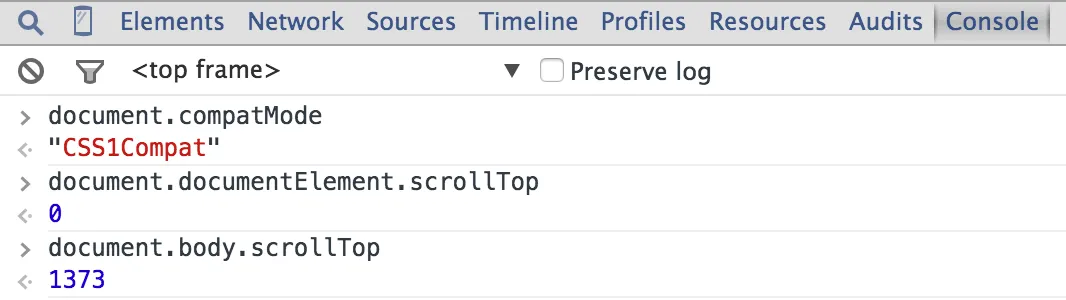
What a trap. As promised, if there is a document declaration (that is, the docType of the first sentence of the web page), the value of document.compatMode is equal to “CSS1compat”. Standard browsers only recognize documentElement.scrollTop.
I also tried IE and Firefox, and they both recognized documentElement.scrollTop. It was chrome’s fault!
Fortunately, document.body.scrollTop and document.documentElement.scrollTop have a characteristic, that is, only one value will take effect at the same time. For example, when document.body.scrollTop can get a value, document.documentElement.scrollTop will always be 0; vice versa. So it can be written like this:
var scrollLeft = document.body.scrollLeft + document.documentElement.scrollLeft;
var scrollTop = document.body.scrollTop + document.documentElement.scrollTop;
7. Get all DOM elements
I suddenly thought of it
var ele = document.getElementsByTagName('*');
8. Judgment of authenticity
The object is always true, and the basic type depends on whether it is empty.
!![] // true
!!{} // true
!!'' // false
!!0 // false
It’s easy to mistake an empty array for false!
It’s easy to mistake an empty array for false!
It’s easy to mistake an empty array for false!
Say important things three times!
9. Recursively obtain all child elements
There is a problem with this. Only the next level of child elements can be obtained:
var children = function (element) {
    var allchilds = [];
    var child = element.childNodes;
    if (childn. length !== 0) {
        for (var i = 0, len = child.length; i < len; i++) {
            allchilds.push(childn[i]);
            allchilds.concat(childs(childn[i]));
        }
    }
    return allchilds;
}
But if you change it to this, you can get all child elements:
var allchilds = [];
var children = function (element) {
    var child = element.childNodes;
    if (childn. length !== 0) {
        for (var i = 0, len = child.length; i < len; i++) {
            allchilds.push(childn[i]);
            allchilds.concat(childs(childn[i])); //or childs(childn[i]);
        }
    }
    return allchilds;
}
The reason for the problem in the first piece of code is unknown. I have been thinking about it all night and made no progress.
In addition, strange phenomena discovered during the debugging process:
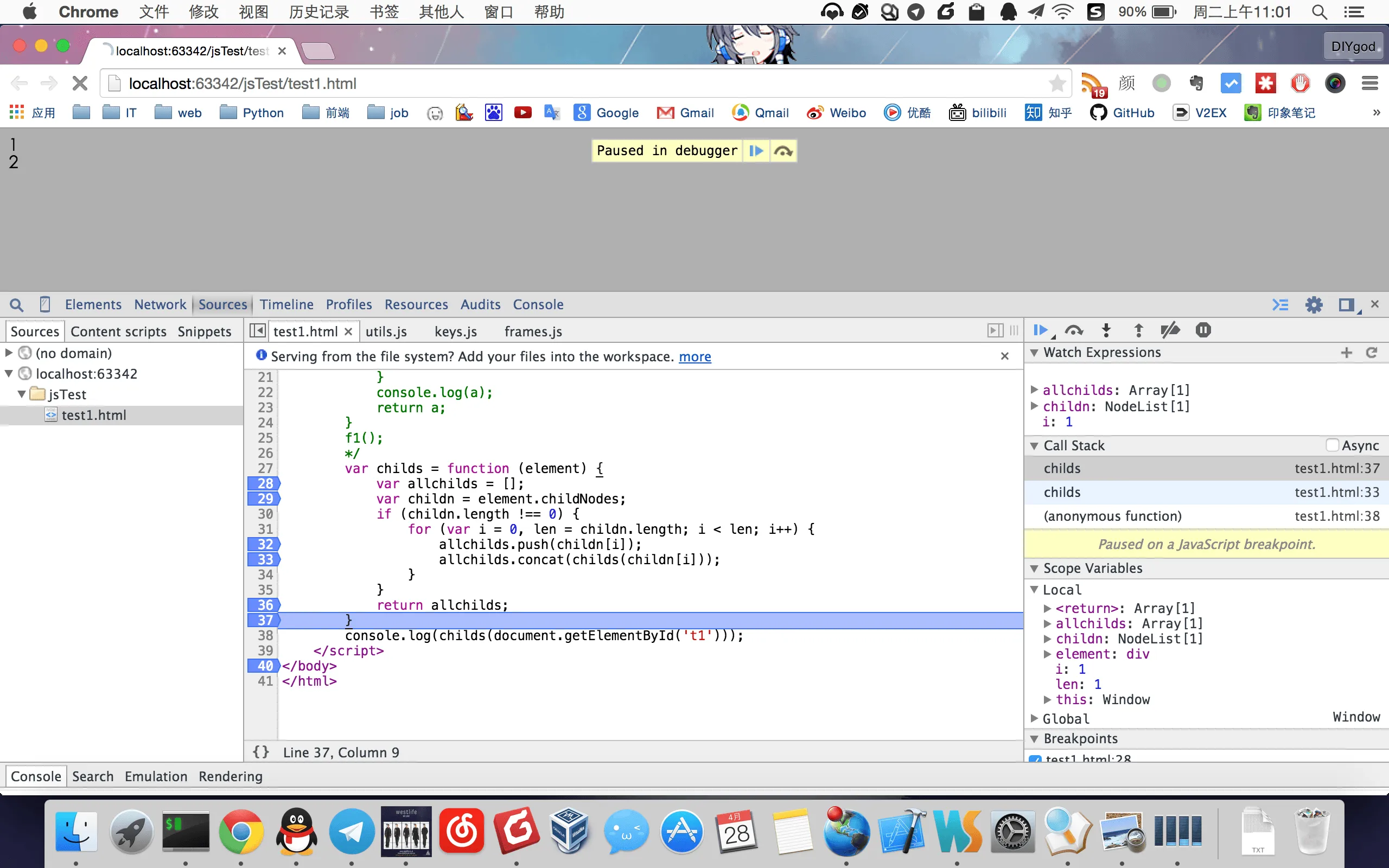
Explanation: The return value allchilds during a recursive call is correct, but it is not added to allchilds at the previous level when returning to the previous level.
Yueyue Tell me there is something wrong with this sentence!
allchilds.concat(childs(childn[i]));
w3school says: The concat() method is used to connect two or more arrays. This method does not modify the existing array, but simply returns a copy of the concatenated array. Only a copy of the concatenated array will be returned. Only a copy of the concatenated array will be returned.
Everything makes sense. .
So it has nothing to do with the declaration position of allchilds. The direction of debugging has always been wrong. It needs to be changed like this:
var children = function (element) {
    var allchilds = [];
    var child = element.childNodes;
    if (childn. length !== 0) {
        for (var i = 0, len = child.length; i < len; i++) {
            allchilds.push(childn[i]);
            allchilds = allchilds.concat(childs(childn[i]));
        }
    }
    return allchilds;
}
Unexpectedly, with the help of Yueyue Li Sheng Egg Fried Rice I finally completed this small function…
Follow-up: It suddenly occurred to me that I could easily obtain it this way
element.getElementsByTagName('*');
Vomited blood
10. Array merging (Refer to JavaScript concat() method)
Important things should be discussed separately. Because I was screwed.
The concat() method is used to concatenate two or more arrays.
This method does not modify the existing array, but simply returns a copy of the concatenated array.
This method does not modify the existing array, but simply returns a copy of the concatenated array.
This method does not modify the existing array, but simply returns a copy of the concatenated array.
Incorrect usage:
arr1.concat(arr2);
Correct usage:
arr1 = arr1.concat(arr2);
11. Event Agent (Reference javascript event agent)
In programming, if we do not want or cannot directly manipulate the target object, we can use delegate to create a proxy object to call the method of the target object, thereby achieving the purpose of manipulating the target object. Needless to say, the proxy object must have a reference to the target object.
You can use the event proxy method to elegantly use one function to proxy another function, such as:
var delegate = function (method) {
    return function() {
        return method.apply(null, arguments);
    }
}

var on = delegate(addEvent);
var un = delegate(removeEvent);
In this way, the on un function can be used to proxy the addEvent removeEvent function elegantly. This achieves the hiding of the target object, which is very useful for us to protect some core objects.
I was wrong, just do this. .
var on = addEvent;
var un = removeEvent;
12. Object related (Reference What is the Object of js?)
Array, Boolean, Date, Function, Number and other objects are actually derived from Object, and their ancestors are all Object. They represent different language features. For example, Array has an automatically managed length attribute, Boolean only has true or false values, Date represents a time structure, and Function can be run. These are all capabilities given to them by their original type (valueOf).
So some interesting stuff:
function f() {
    alert('f1');
}
f.c = function() {
    alert('c1');
}

f();
f.c();
You can give a function an attribute that is also a function.
13. JavaScript regular expression grouping (Refer to JavaScript regular expression selection, grouping and reference)
Example:
function getCookie(cookieName) {
    var re = new RegExp(cookieName + '=(.*?)($|;)');
    return re.exec(document.cookie)[1];
}
Among them, re.exec(document.cookie) is an array. The first element is all the characters matched by the regular expression. The second element is the first matched group, that is, the content in the first bracket: (.*?)
Grouping is a subexpression in a regular expression, which can be used to obtain a specific part of the string matched by the regular expression.
9.20 update: When using the constructor to create a regular object, the normal character escaping rules (preceded by a backslash ) are required. For example, the following are equivalent:
var re = new RegExp("\\w+");
var re = /\w+/;
14. JavaScript cross-domain (Refer to JavaScript cross-domain summary and solutions)
For security reasons, JavaScript does not allow cross-domain calls to objects on other pages. However, in addition to security restrictions, it also brings a lot of trouble to injecting iframe or ajax applications.
See the reference for specific restrictions and solutions.
15. JavaScript has one more month (Reference Why does new Date in JS have one more month? JavaScript - Use Date for Gantt chart Problems encountered when using objects)

It was obviously set in May, but it turned out to be June.
In reality, we don’t count months from 0, but JavaScript does. 0 in JS is our January, and 1 in JS is our February…
So remember to subtract one when setting the month, and remember to add one when getting the month. .
15. Timers do not block code execution
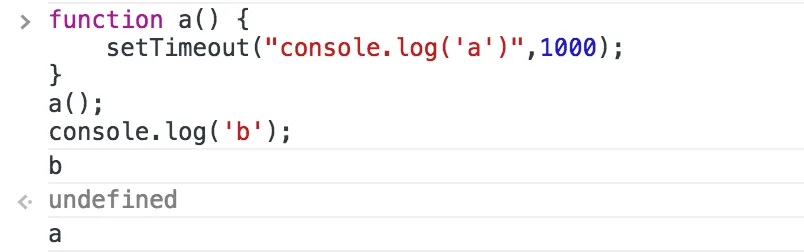
My original intention was to execute a() and then output b. Unexpectedly, b was output first. From this, we can also infer that the timer will not block the execution of subsequent statements.
☆ミ(o*・ω・)ノFinished and scattered flowers, waiting for review