written in front
If you are curious about whether the work at Bilibili is interesting, or what I have been doing since I came to Bilibili, then this article may answer some of your questions.
After coming to Bilibili, in addition to being responsible for some modules, reconstruction and daily maintenance of the HTML5 player, BAS advanced barrage is the largest project I have been responsible for development in the past six months.
This article is compiled from today’s sharing of superpolar electromagnetic waves in the company (it is said that I am still the youngest lecturer in history (=・ω・=)), and it can also be regarded as a phased summary of this project.
What is BAS barrage?
BAS, the full name of Bilibili Animation Script, is a new generation of bilibili’s advanced barrage script language. It is a text used to describe advanced barrage styles, interactions and animations.
BAS barrage is an advanced barrage described by BAS. It consists of elements and animations. Elements are divided into text objects, interactive buttons, and path objects. Animations are divided into simple animations, series animations, and parallel animations.
BAS Danmaku is mainly aimed at high-end players such as subtitle writers, and can be used in subtitles, special effects, interactive applications, games, pure Danmaku works and other scenarios.
At present, the web client has been launched and the mobile client has been basically developed. It is expected to be used in next year’s activities or New Year celebrations.
We made several videos to visually demonstrate BAS barrages:
The first one is the barrage PV made by Mr. Maojiang: https://www.bilibili.com/video/av257649/
The second one is a rotten apple implemented by barrages: https://www.bilibili.com/video/av18682336/
The third is a demonstration of interactive buttons: https://www.bilibili.com/video/av16558829/index_3.html#page=3. In addition, Bilibili Ranking Weekly is also a good application scenario.
In terms of subtitle applications, it is easy to implement a tool such as converting subtitle files to BAS, and we will continue to do such things in the future.
Comparison of several advanced barrages
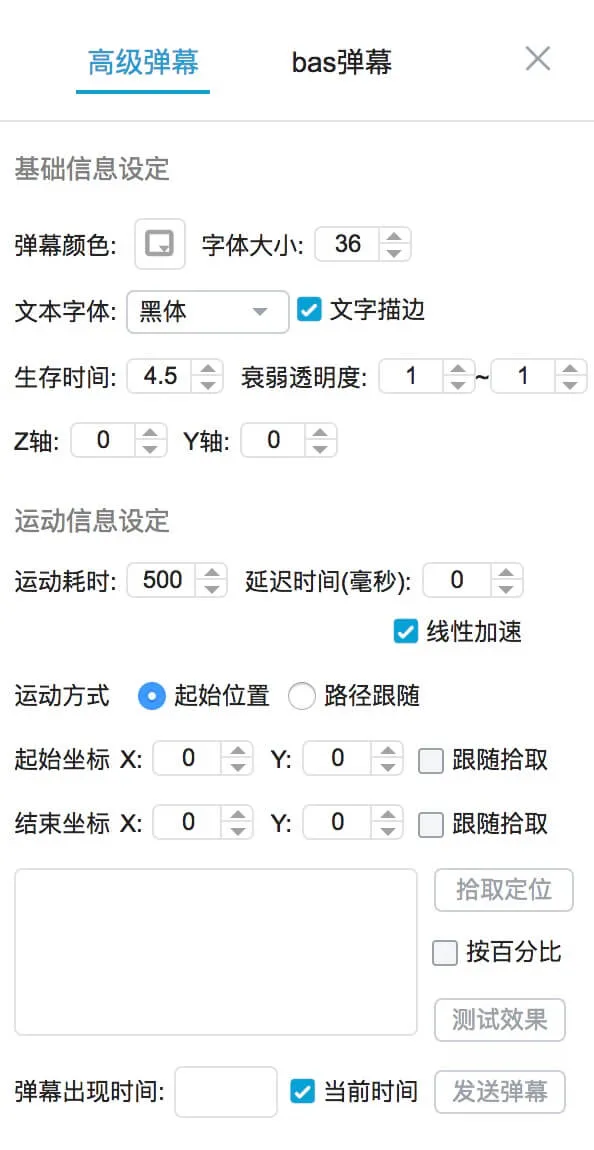
mode7
Danmaku is set through the interface and does not require writing code. It is simple to use but has limited functions.
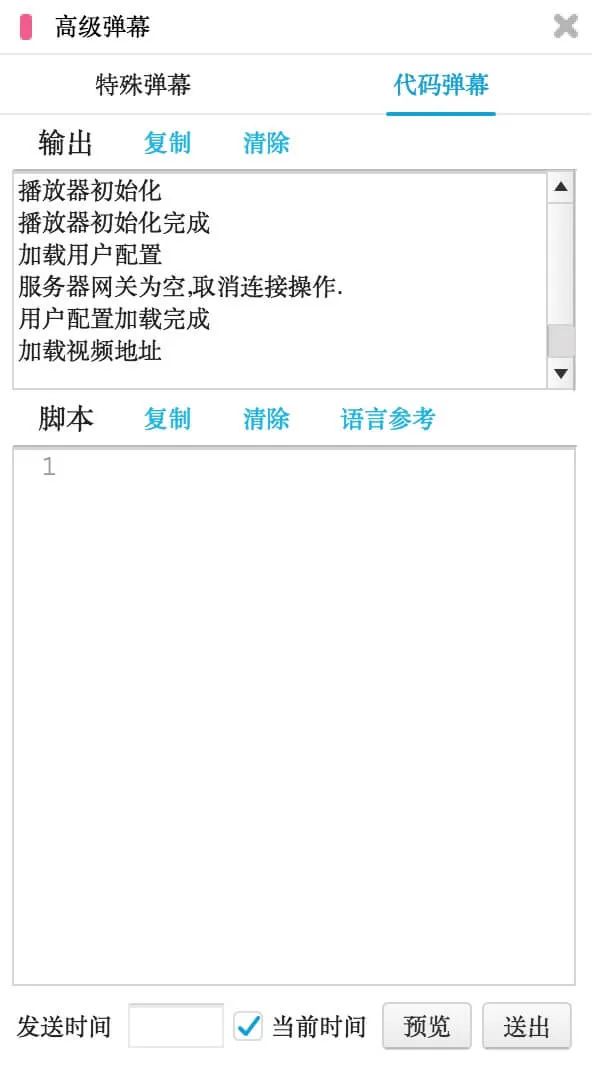
mode8
That is, the code barrage is very powerful but requires writing code, is complex to use, has poor security, and only supports the Flash platform.
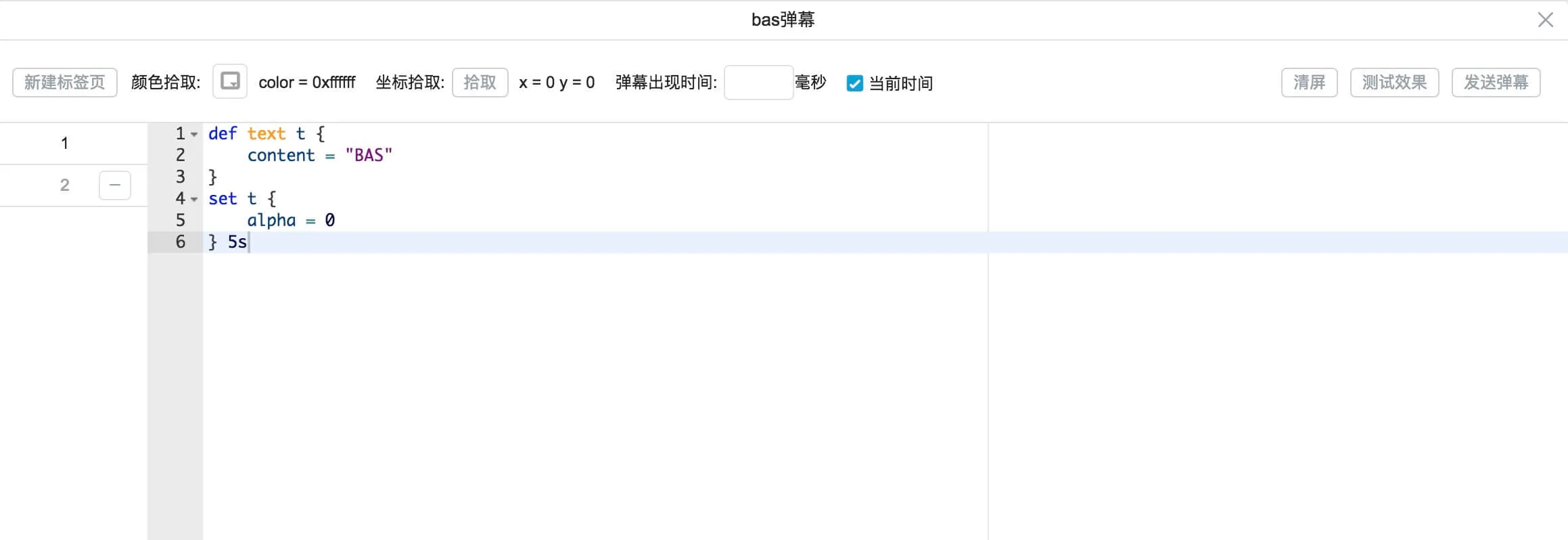
mode9
That is, BAS barrage is a compromise between mode 7 and mode 8.
Compared with mode 7, mode 9 requires scripting and is slightly more complex to use, but it supports interaction, graphics and more complex animations, and is much more powerful.
Compared with mode 8, mode 9 simplifies the syntax and uses declarative style, which is simpler to use; safer, the player parses the implementation, illegal scripts will not be released, the program is controllable, instead of directly operating the barrage; it can be cross-platform.
Use BAS barrage
Send permission
First of all, there are strict restrictions on the permission to send BAS barrages. In terms of design, ordinary users need to purchase it with coins first, and then wait for confirmation from the UP owner before they can use it. Only users with special permissions such as subtitlers can use it directly, but it is currently only open to subtitlers. After subtitlers use it and improve it, they will consider expanding the use scenarios.
| Coin Purchase | UP Master Confirmation | |
|---|---|---|
| Ordinary members | √ | √ |
| UP main | √ | × |
| VIP | × | √ |
| Subtitler/Administrator | × | × |
Send entry
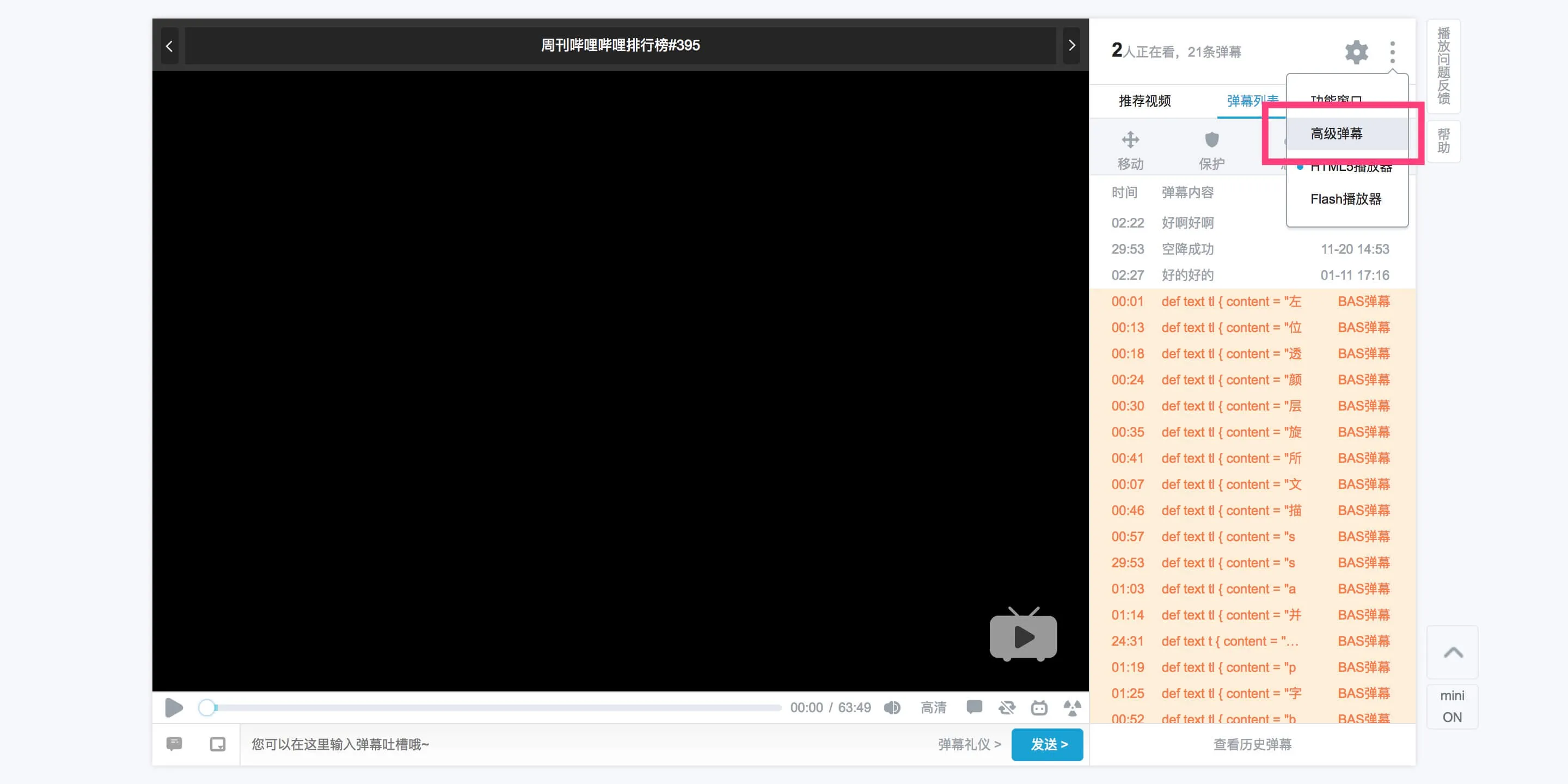
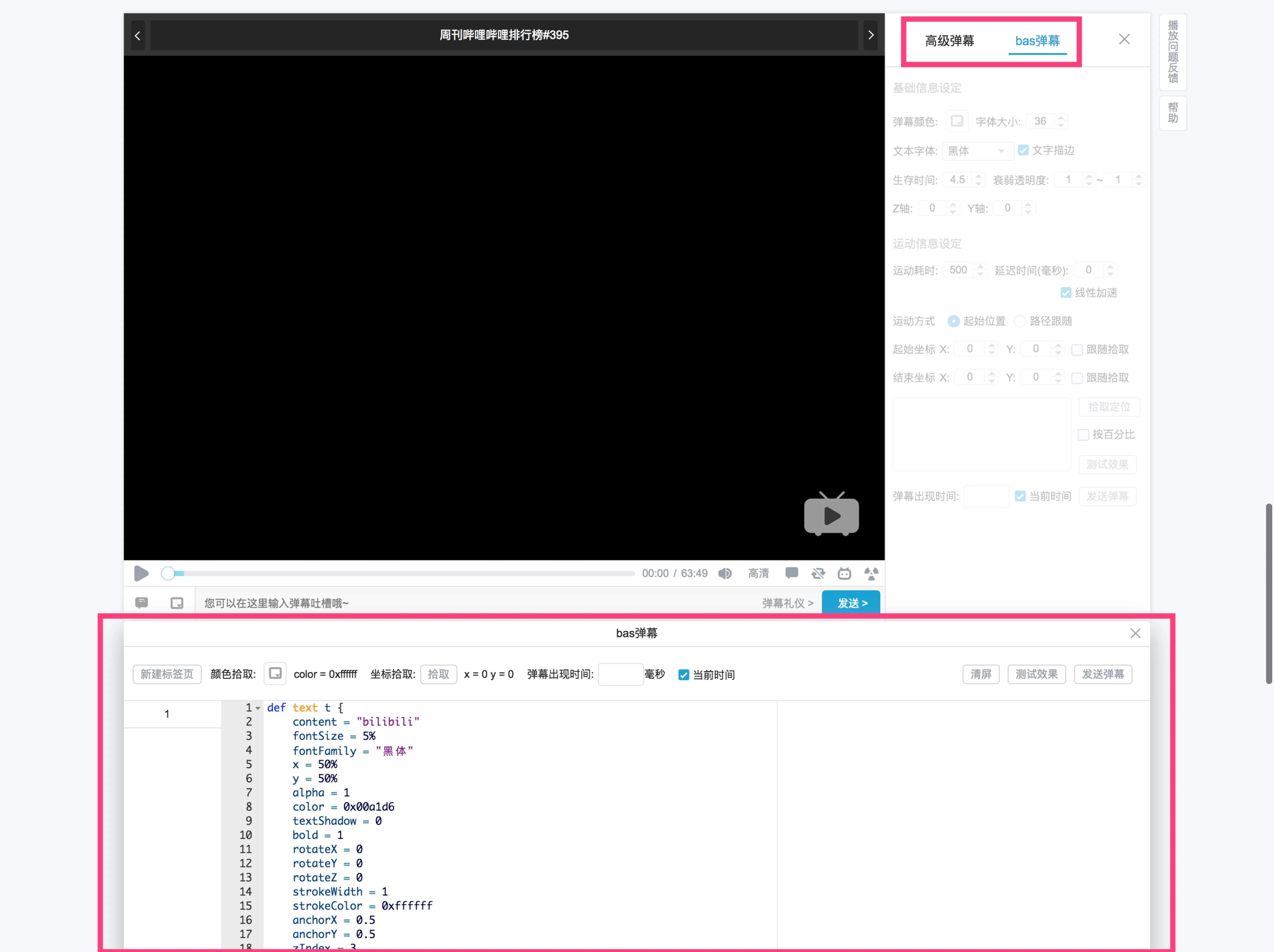
Note that the entrance is hidden when there is no sending permission. At this time, you can try it in Laboratory.
Write script
Let’s try to write some simple scripts. BAS script is very simple. It is a declarative and descriptive script with easy-to-use syntax, which ensures the independence of object blocks and operation blocks.
The easiest way to try BAS barrages is to use the examples and labs on Documentation. You can open it in a new tab in your browser and follow the examples to try out some basic usage.
Taking text objects as an example, a simple text object with fade animation looks like this:
def text demo {
    content = "BAS"
}
set demo {
    alpha = 0
} 5s
In this way, we successfully created a fading BAS barrage. It looks very simple, but js does a lot of work behind the scenes. js will first parse the BAS script into an object that js can recognize, apply the default attributes, and then render it into the player and start the animation at the same time. At this time, you can see a fading white text in the upper left corner of the player.
Positioning
Positioning is also very simple. The positioning of BAS barrage is determined by the barrage anchor point (anchorX anchorY) and the stage position (x y). The anchor point is the center point of the barrage, (0, 0) is the upper left corner of the barrage, and (1, 1) is the lower right corner of the barrage.
def text tl {
    content = "左上"
    x = 0
    y = 0
    anchorX = 0
    anchorY = 0
}
def text tr {
    content = "右上"
    x = 100%
    y = 0
    anchorX = 1
    anchorY = 0
}
def text bl {
    content = "左下"
    x = 0
    y = 100%
    anchorX = 0
    anchorY = 1
}
def text br {
    content = "右下"
    x = 100%
    y = 100%
    anchorX = 1
    anchorY = 1
}
def text c {
    content = "中心"
    x = 50%
    y = 50%
    anchorX = 0.5
    anchorY = 0.5
}
Barrage stage
The barrage stage is the drawing range of the barrage. The barrage stage defaults to the real area of the video. In addition, the text object can specify other text objects as parent elements through the parent attribute, and the parent element is used as the stage for drawing. The parent element will affect the positioning, scaling, etc. of the child elements.
def text a {
    content = "□"
    fontSize = 40%
    x = 0
    y = 0
    color = 0xffff00
}
def text b {
    parent = "a"
    content = "□"
    fontSize = 20%
    x = 0
    y = 0
    color = 0xff00ff
}
set a {
    x = 50%
    y = 0
} 2s
then set a {} 3s
set b {
    y = 50%
} 3s
then set b {} 3s
Life cycle
Life cycle is another important concept of BAS. The life cycle is the survival time of the barrage. When the duration attribute is not specified, the element life cycle is the total animation time. When there is no animation, the default is 4s. After the life cycle ends, the element will be cleared from the stage.
def text a {
    content = "BAS"
}
def text a {
content = "BAS"
duration = 10s
}def text a {
content = "BAS"
}
set a {} 10sAdaptive
When the position and font size are percentage values, they can be adapted according to the stage size, which can achieve the consistency effect of the barrage on various platforms and different player sizes, so that the position and size of the barrage relative to the video are fixed under different circumstances. The position coordinates are the current stage width and height _ percentage value px, and the font size is the current stage width _ percentage value px.
def text c {
    content = "BAS"
    x = 50%
    y = 50%
    anchorX = 0.5
    anchorY = 0.5
    fontSize = 5%
}
When the player size is changed at this time, the size of the barrage will also change with the player. As a result, its position and size relative to the video are fixed.
Interaction
Currently, only interactive buttons support some simple click effects, such as jumping to a certain time point in the video, opening other videos in a new window, etc.
seek button:
def button c {
    text = "跳转到30分钟"
    x = 35%
    y = 45%
    fontSize = 5%
    textColor = 0xffffff
    fillColor = 0x80D8FF
    target = seek {
        time = 30m
    }
}
av jump button:
def button c {
    text = "av1714157"
    x = 35%
    y = 45%
    fontSize = 5%
    textColor = 0xffffff
    fillColor = 0x80D8FF
    duration = 2s
    target = av {
        av = 1714157
        page = 1
        time = 20.5s500ms
    }
}
bangumi jump button:
def button c {
    text = "第22话 春风"
    x = 35%
    y = 45%
    fontSize = 5%
    textColor = 0xffffff
    fillColor = 0x80D8FF
    duration = 2s
    target = bangumi {
        seasonId = 1699
        episodeId = 80041
        time = 1m30s
    }
}
Graphics
You can use the path object to draw svg graphics, and the d attribute corresponds to the path of the svg.
def path p {
    d = "M30.828,30.422 18.997,16.260 Z"
    viewBox="0 0 32 34"
    x = 45%
    y = 45%
    scale = 3
    borderWidth = 1
    borderColor = 0xffffff
    borderAlpha = 0.8
    fillColor = 0x00a1d6
    fillAlpha = 0.8
}
Animation
Animation is divided into simple animation, series animation and parallel animation.
The attributes of barrage can be classified into gradient, non-gradable, and immutable. Only gradientable attributes can have normal animation effects. Setting new values for non-gradient attributes will take effect immediately, and setting values for immutable attributes will be ignored. In principle, a certain attribute can only appear once in a set statement. In terms of implementation, if it appears multiple times, the last one will prevail.
Cascaded animations run sequentially.
def text a {
  content = "BAS"
}
set a {
    color = 0x000000
} 1s
then set a {
    alpha = 0
} 1s
Parallel animations are performed at the same time. When the same attributes are connected in parallel, the last conflicting animation will be ignored. Due to technical limitations, x y rotateX rotateY rotateZ scale are regarded as the same attribute.
def text a {
  content = "BAS"
}
set a {
    color = 0x000000
} 1s
set a {
    alpha = 0
} 1s
Front-end implementation of BAS barrage
From BAS script to DOM element rendered in the browser, there are mainly the following steps:
- Parse the BAS script into a js object (https://github.com/aristotle9/as3cc)
- Apply default values and calculate percentage values
- Monitoring life cycle
- Resolve attribute conflicts
- Draw elements, apply styles and animations
- Bind interactive events
Positioning
Positioning is determined by the anchor point (anchorX anchorY) and position (x y) of the BAS script. In implementation, two nested DOM elements are used. The external element locates the stage position, and the internal element locates the barrage anchor point, such as a centered text object:
def text c {
    content = "BAS"
    x = 50%
    y = 50%
    anchorX = 0.5
    anchorY = 0.5
}
The rendered DOM structure is roughly like this:
<div style="transform:translate((舞台宽度*50%)px, (舞台高度*50%)px);">
  <div style="transform:translate(-50%,-50%);">BAS弹幕</div>
</div>
Animation
Considering browser compatibility and ease of use in animation, CSS3 animation is the best choice, and the properties involved are:
| Properties | Description |
|---|---|
| @keyframes | Define animation |
| animation-name | The name of the animation corresponding to @keyframes |
| animation-duration | The time it takes for the animation to complete one cycle |
| animation-play-state | animation running or paused |
| animation-timing-function | animation speed curve |
Simple animation
Using the example above:
def text demo {
    content = "BAS"
}
set demo {
    alpha = 0
} 5s
The DOM structure rendered by such a BAS script is roughly as follows:
<style>
  @keyframes a1 {
    100% {
      opacity: 0;
    }
  }
</style>
<div style="animation-name:a1;animation-duration:5s;opacity:1;">BAS</div>
keyframes defines animation keyframes, and the transparency is zero when the animation ends; animation-duration corresponds to the animation time of 5s.
Parallel animation
Define multiple keyframes to enable multiple animations to run simultaneously.
def text a {
    content = "BAS"
}
set a {
    color = 0x000000
} 1s
set a {
    alpha = 0
} 1s<style>
@keyframes a1 {
100% {
color: #000000;
}
}
@keyframes a2 {
100% {
opacity: 0;
}
}
</style>
<div
style="animation-name:a1,a2;animation-duration:1s,1s;opacity:1;color:#ffffff;"
>
BAS
</div>Series animation
Use animation-delay to stagger the start times of different animations to achieve a series effect.
def text a {
  content = "BAS"
}
set a {
    color = 0x000000
} 1s
then set a {
    alpha = 0
} 1s<style>
@keyframes a1 {
100% {
color: #000000;
}
}
@keyframes a2 {
0% {
color: #000000;
}
100% {
color: #000000;
opacity: 0;
}
}
</style>
<div
style="animation-name:a1,a2;animation-duration:1s,1s;animation-delay:0s,1s;opacity:1;color:#ffffff;"
>
BAS
</div>Status control
Start
animation-play-state: running
Pause
animation-play-state: paused
Intermediate state
Setting animation-delay to a negative value allows you to start animation from an intermediate state.
For example, the life cycle of the barrage corresponds to 1s to 5s of the video. When the video jumps to 4s, the animation-delay property of the barrage needs to be set to -1s.
End
When the life cycle ends, the element needs to be cleared in time. The principle is that the end of the animation animation will trigger the animationend event. When this event is triggered, the element can be cleared. When the element has no animation, you need to specify an empty animation.
<style>
  @keyframes a1 {
    100% {
    }
  }
</style>
End.